OpenMates v0.9: New apps & skills, AI models, file upload & more
OpenMates v0.9: New apps & skills, AI models, file upload & more
Published April 18, 2026 at 9:33 PM
Hey there, Marco (aka glowingkitty) here — the creator of OpenMates. I haven't forgotten about OpenMates — quite the opposite.
🙏 A few words of thanks first
At the end of December, in the context of Chaos Communication Congress, I was unexpectedly asked for an interview on the German TV channel ZDF (a report discussing the importance of privacy-focused alternatives to big tech AI companies). And wow, what an experience. Despite OpenMates having been a lot rougher around the edges at that time, the first people started to sign up and use it — and also finding bugs and edge cases which I didn't experience during my testing on my own devices, and thankfully reported them. Thanks a lot to everyone who did that — it really helped a lot with making OpenMates more polished, more stable and more complete! And of course you are super welcome to keep reporting issues if you notice anything feeling wrong or broken on OpenMates.
While this wasn't the first software I created, it was the first time that more than a handful of people started using software I built — over 180 active users so far are using OpenMates! Which has been super exciting, and admittedly at first also a bit overwhelming.
Since then, I've focused completely on improving and debugging OpenMates, and getting it more feature-complete and polished — and made a ton of changes to the code. Bug fixes, new features, an improved user interface, and many more improvements.
And today, I'm happy to give you an update with the most exciting changes from the past few months! Keep in mind, talking about all the changes would be too much for a single newsletter — so instead I'll focus on the highlights and also publish multiple short videos about various features on OpenMates in the weeks to come, on:
✨ The highlights of the last months
1. 🧩 New apps & app skills
In addition to the existing capabilities of searching the web, reading & analyzing websites, and reading the transcripts of YouTube videos to start discussions — OpenMates got a lot of new apps and app skills. Here are some highlights:
- 🏥 Health: Looking for doctor appointments? The Health app can now check Doctolib and Jameda for available slots.
- 🏠 Home: Search for apartments on ImmoScout24, WG-Gesucht and Kleinanzeigen — with the key details directly visible on OpenMates.
- 🎉 Events: Search & filter for events on Meetup, Luma, Resident Advisor and Google — with details like descriptions, images, when and where the events are, and direct links to RSVP or join them.
- ✈️ Travel: The new 'Search connection' skill lets you search for flights via Google, across multiple connections on various days simultaneously — incl. full flight details and booking links. Support for train connections will follow. And the 'Price calendar' skill shows you a quick overview of the price development across a month.
- ⏰ Reminders: Create a reminder for a chat to come back to it later — or even trigger OpenMates to search & summarize the latest daily news for a given topic, for example.
- 🖼️ Images: Search for images on the web, generate images and vector graphics.
- 📄 PDFs: Upload PDFs and ask questions about the text or even the visual layout — OpenMates can both read and view PDFs!
- 💻 Code: OpenMates can search for the latest docs to answer coding-related questions, then write code — and even let you preview website designs and code directly in the browser! And this is only the early beginning of its coding capabilities.
- 🧮 Math: Calculate expressions and even visualize plots, all within OpenMates.
- 📝 Docs: Ask for Word documents to be generated — and download them as .docx files.
- 📊 Sheets: OpenMates can also create tables and let you download them as .xlsx files. And both Docs and Sheets will get even better and more powerful in the weeks to come.
- 📧 Mail: OpenMates can draft emails for you, which you can then easily open & send via your default email program on your device.
- 🎙️ Audio: Don't want to type? Record and send a voice message to OpenMates, directly from the message field.
And even more app skills have been added. Just check out & explore the OpenMates Apps.
2. 🔒 Personal Data Placeholders
Unlike AI chatbots from big tech companies and typical startups, OpenMates is designed with your privacy as a main priority. And it already had various privacy protections in place:
- 🔐 all your chats are encrypted & decrypted on your device only
- 🖼️ all external images are loaded via our OpenMates server (so external websites don't see your IP address or device information)
- 📉 no Google Analytics or any other analytics software is used on OpenMates (which is also why you don't see a cookie banner on OpenMates)
What's new: sensitive data like email addresses, phone numbers, API keys and more is automatically detected and replaced with placeholders on your device, when you draft and send a message to OpenMates. You can always switch back to the original value in the user interface, and you can click on detected data to prevent the replacement. But by default, this feature ensures that neither OpenMates nor the AI providers that process your messages will ever see the sensitive data in the first place.
Try it yourself — click this link to see the Personal Data Placeholders in action: your email and phone number will be auto-detected and replaced before being sent to the AI.
3. 🧠 Memories
OpenMates can now remember app-specific memories, like your upcoming trips or project details. BUT: all the memories are encrypted & decrypted only on your device, and are only ever shared temporarily with the OpenMates server and AI provider if you explicitly confirm it for the given chat. This lets you make full use of personalized responses without constantly repeating your project details — while still staying fully in control over what data you share, when, and with which AI provider. Check out the Memories in the OpenMates Apps.
4. 🎯 Focus Modes
Knowing how to give the right instructions to an AI chatbot makes a huge difference in terms of how helpful the chatbot will be and the quality of the responses. With Focus Modes, you don't need to be an expert in prompt engineering to make full use of great, targeted instructions. Just ask OpenMates for career insights, for example, and the 'Career insights' focus mode should automatically get activated to guide you through the process. And of course: this is only the beginning. A lot more Focus Modes will be added, and the quality of the existing ones will be further improved in the weeks to come. Feel free to check out the Focus Modes in the OpenMates Apps.
5. 🤖 New models
OpenMates has a wide selection of the most efficient and best-performing AI models out there. By default, it auto-selects the right one based on the task. But you can always override this behaviour in the AI settings permanently, or on demand by mentioning a specific model in the message field via @{modelname}. You can now select from a wide range of AI models, for example:
- Claude Opus 4.7 & Claude Sonnet 4.6
- Gemini 3.1 Pro & Gemini 3 Flash
- GPT-5.4
- DeepSeek V3.2
- Devstral 2
@bestand@fastmodel aliases — type@bestto auto-route to the strongest model,@fastto use the fastest model available on OpenMates.
6. 💡 Daily Inspirations & Wikipedia links
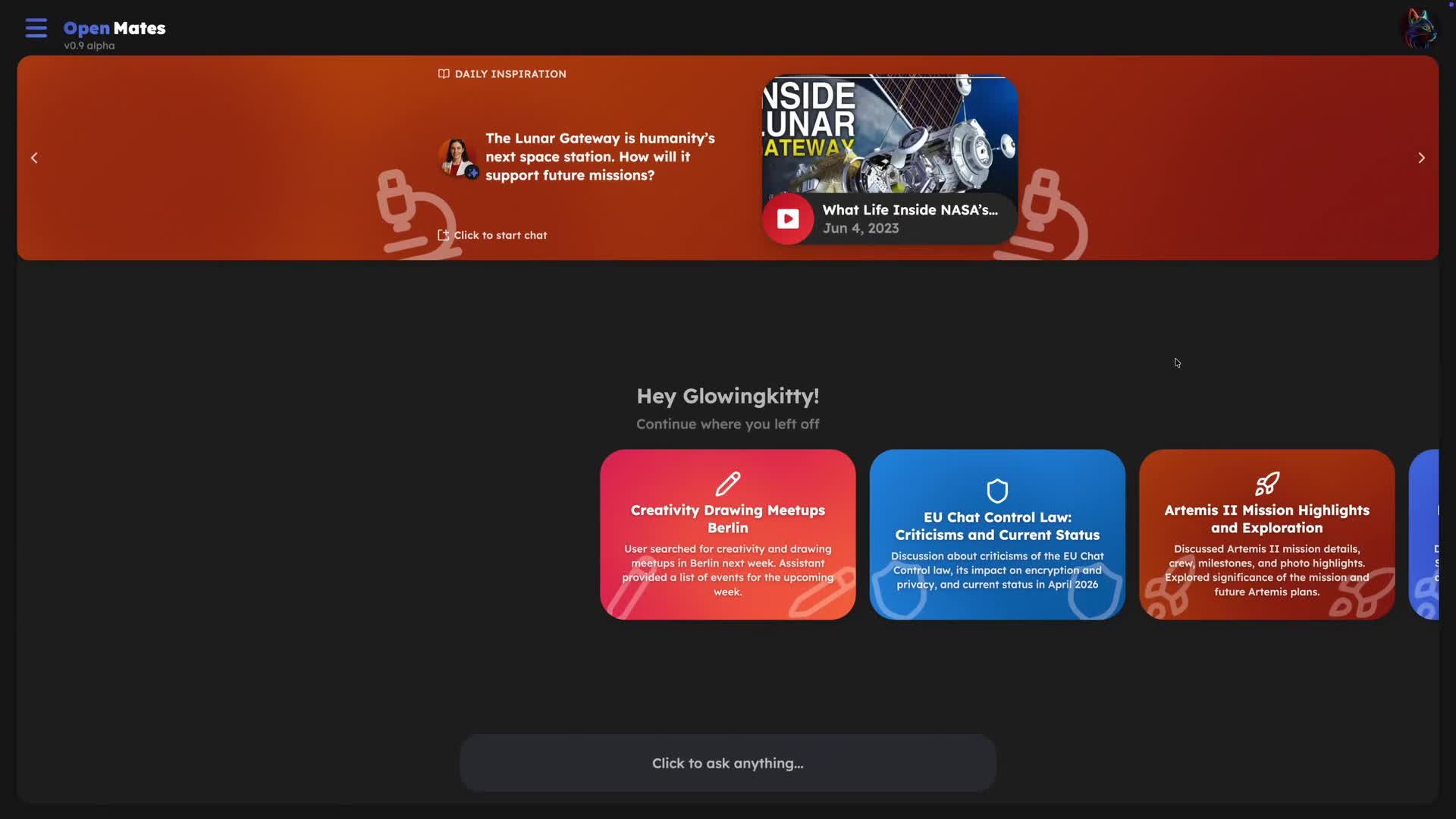
AI, if used properly, can be an amazing tool for learning. And OpenMates is optimized to encourage people to learn, to explore, to get inspired. That's what the Daily Inspirations are for, which you see at the top of the interface after you log in. They show interesting new videos — and soon also other content like Wikipedia articles, new OpenMates features, photos and details of art pieces, important historical events and more. Daily Inspirations are tailored to your chats, then locked on your device with a key only you have — so they stay private to you. In addition, OpenMates is also auto-highlighting Wikipedia articles in the responses of assistant messages. Which makes it super easy to learn more about a topic by just clicking on the orange highlighted word with the study icon next to it.
🚀 What comes next
In the weeks to come I will post various short clips showing the many features of OpenMates and the useful things one can do with it, as well as further improving the software and adding more apps, providers and features.
From now on my plan is to send newsletter emails for announcements & updates every few weeks, and separately also tips & tricks on how to use OpenMates. Feel free to check your newsletter settings any time, if you want to receive more or less newsletter emails.
Have fun using OpenMates, and stay tuned for more updates!